 90%
90% 75%
75% USA
USA Canada
 Australia
 UK
UKACR Has More Features Than You Think: Here’s Where to Find Them


America’s Cardroom (ACR) packs plenty of useful features into its poker software, but some of the best tools are easy to miss. Digging into the settings can help you create a cleaner layout, speed up common actions, and make important information easier to track while you play.
Our guide to the best ACR features shows you how tools such as hotkeys, preferred seating, and customizable tournament displays can improve the way you use the software. These features can make ACR easier to navigate, more comfortable during longer sessions, and better suited to the way you prefer to play.
ACR Features at a Glance
Here are our favorite ACR features in a central table so you can quickly learn what they are, and if you want to learn more about the poker room, you can read our in-depth America’s Cardroom review.
| Feature | What It Does | Why It’s Useful |
|---|---|---|
| Hotkeys | Assigns keyboard shortcuts to poker actions | Lets you play without constantly using your mouse |
| Preferred Seating | Keeps you in the same visual seat | Makes tables easier to consistently read |
| Custom Tournament Stats | Lets you choose custom stats to display | Keeps your most useful tournament information visible |
| Table Themes & Dark Mode | Changes the appearance of the poker table | Creates a cleaner or more comfortable setup |
| Auto Buy-In & Top Up | Automatically manages your cash-game stack | Saves repeated buy-in and rebuy clicks |
| Tournament Filters | Narrows the tournament lobby | Helps you find suitable games faster |
| Custom Tournament Info | Organizes tournament information details | Reduces lobby checking during tournament play |
| Hand Histories & HUD Support | Saves hands and supports tracking tools | Helps with reviewing your play |
| Run It Twice | Deals remaining cards twice after an all-in | Can reduce short-term cash-game variance |
| Multi-Table Tools | Tiles or cascades several poker tables | Helps organize busy sessions |


1. Set Up Hotkeys for Faster Poker Actions
One of the most useful ACR settings is easy to overlook. Hotkeys let you assign keyboard buttons to common actions instead of moving your mouse around the table every time you need to fold, call, or raise. You can turn them on under Playing Tools in the software settings.
ACR gives you more options than just the basic poker actions. Separate shortcuts can:
- Control bet-size buttons
- Move the bet slider
- Sit you out on the next blind
- Open your last hand history
- Arrange your tables
- Create shortcuts for Fold and Stay when playing Blitz Poker
The biggest advantage of setting up hotkeys appears when you have several tables open. A simple setup such as F1 for fold and F2 for check/call can remove a lot of unnecessary mouse movement. Pick keys carefully, though, because an accidental shortcut can mean an accidental and irreversible poker decision.
2. Use Preferred Seating to Keep Every Table Familiar
Your actual poker position changes after every hand, but your cards don’t have to move around your screen. ACR’s Preferred Seating feature lets you choose where your own seat appears visually whenever you join a table.
For example, you might choose the bottom-center seat because it puts your cards and chip stack directly in front of you. ACR can automatically place you there each time, even though the software is only changing your view of the table. It doesn’t affect where you actually sit in relation to the dealer button.
You can set separate preferences for different table sizes, including six-handed, eight-handed, and nine-handed games. This is especially useful when playing multiple tables because your own cards stay in roughly the same place on every screen. Instead of searching each new table for your avatar, you immediately know where to look.
3. Choose Which Tournament Stats Stay on Your Screen
ACR’s tournament statistics display can be customized instead of forcing all players to look at the same information. The expanded display includes details such as:

- Average stack
- Current prize pool
- Blind level
- Top prize
- Remaining late-registration levels
Another useful trick is that you can choose up to four statistics to keep in the smaller display permanently. Open the expanded stats window and use the eye icons to select the numbers you care about most. You can even adjust the transparency if the panel gets in the way of the table.
Different players may want entirely different setups. Someone deep in a tournament might keep the average stack and prize information visible, while another player may care more about blinds and late registration. Customizing the panel means you can check those figures with a glance instead of repeatedly opening the tournament lobby.
4. Customize Your Tables & Use Dark Mode
You spend a lot of time looking at the table when you play online poker, so there’s little reason to keep the default appearance if another setup works better for you. America’s Cardroom supports customizable table themes as well as dark mode, letting you change the look of the client rather than using one fixed design.
This isn’t only cosmetic. A simpler background can make cards, chips, and bet amounts easier to pick out when several tables are open. Dark mode may be more comfortable during longer sessions, especially when you don’t want a bright poker client covering your monitor.
Experiment with the visual settings before settling on one layout. The most colorful table isn’t necessarily the most useful one. A clean theme with strong contrast between the table and the information displayed on it can make the software easier to follow, particularly once your screen starts filling up with multiple games.
5. Turn On Auto Buy-In & Auto Top Up
Cash-game players can automate one of the most repetitive parts of using the ACR software. Auto Buy-In lets you choose how many chips you want whenever you sit at a cash table, while Auto Top Up can restore your stack when it falls below your chosen amount.
You can choose the table minimum, the maximum buy-in, or a set number of big blinds. For example, setting your preferred buy-in to 100 big blinds means you don’t have to type the amount manually whenever you join another table.
Auto Top Up can be even more convenient during multi-table sessions. Instead of noticing that your stack has fallen and manually adding chips, the software handles it according to your settings before the next hand. One detail worth remembering is that these preferences are stored on the computer you’re using. Switching to another machine may mean setting them up again.

Use Auto Top Up Carefully
Auto Top Up makes it easier to keep a full stack in play, but that convenience can make how much money you’ve added during a session less obvious. Set a clear poker budget before you start, and don’t treat automatic rebuys as a reason to keep playing after reaching your planned limit.
Problem gambling can cause personal, financial, and professional harm. Check your balance regularly during longer sessions, and consider turning Auto Top Up off if it makes it harder to track your spending or stick to your limits.
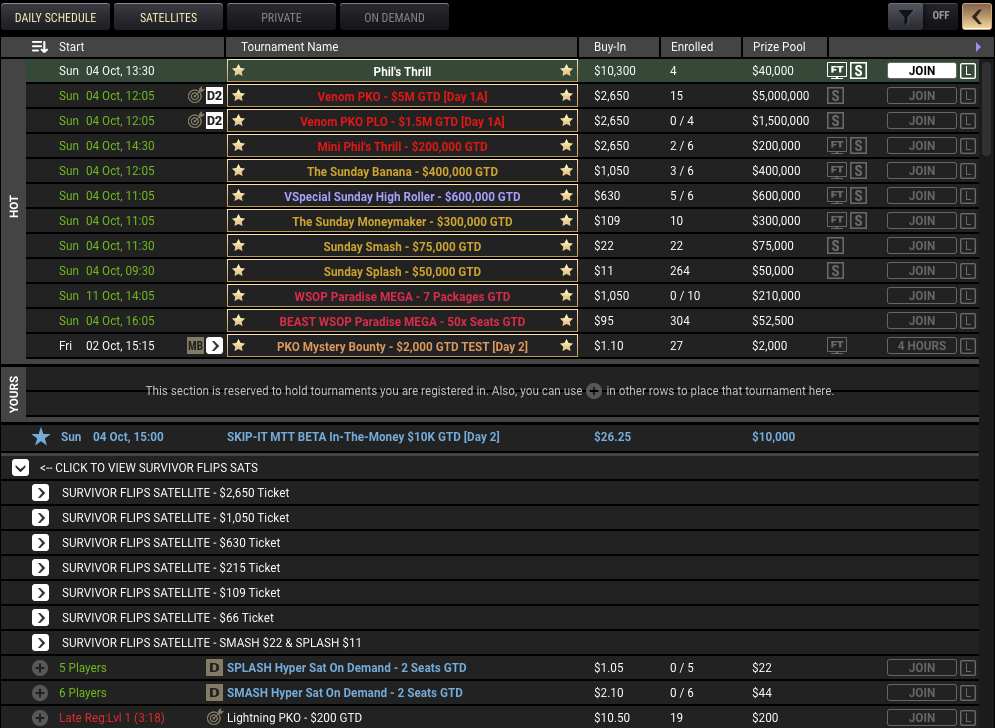
6. Use Tournament Filters Instead of Scrolling the Entire Lobby
The ACR tournament lobby can contain a huge number of events, and scrolling through everything isn’t the fastest way to find a game. Tournament filters let you narrow the list so you see events that match what you actually want to play.
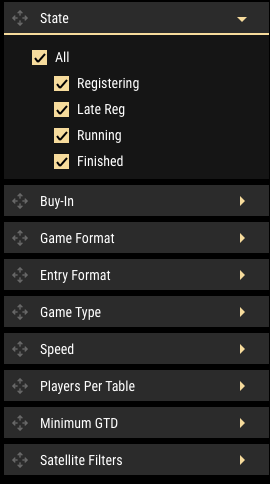
This becomes particularly useful once you know your normal buy-in range and preferred tournament formats. Rather than checking every event individually, you can remove tournaments that don’t fit what you’re looking for and concentrate on a much smaller list.
Newer players can use the same feature to make ACR’s tournament lobby feel less overwhelming. Instead of starting with every available tournament on the network, narrow your choices to the type of poker you want to play and the stakes you’re comfortable with. It’s a simple software feature, but it can save a surprising amount of time before every session.
7. Detach & Rearrange the Tournament Information Panel
ACR gives tournament players much more control over the information window than you might realize. Click the Lobby button from your table, and you can bring up a detailed tournament information panel containing information about stacks, players, payouts, satellites, and the tournament structure.
And since the individual sections can be expanded or collapsed, you don’t need to keep every piece of information open at once. You can simply build a cleaner panel around the details you check regularly.
Players can also detach the entire information box from the poker table and move it somewhere else on the screen. That’s particularly handy with a second monitor or several tournaments running at once. Instead of opening and closing full tournament lobbies, you can group the important information panels together and keep your actual poker tables clear.
8. Save Hand Histories & Use HUD Support
ACR supports downloadable hand histories and heads-up displays, commonly called HUDs. Hand histories record what happened during previous hands, while compatible HUD software can use permitted data to display poker statistics during play.
Even if you never use a HUD, saved hand histories are worth knowing about. Suppose you make a large river call and aren’t sure whether it was sensible. Instead of relying on memory, you can return to the hand afterward and see the bets, cards, and stack sizes again.
ACR’s hotkeys can make this easier because one available shortcut opens the last hand history directly. That creates a useful workflow during a session: mark or inspect an unusual hand quickly, then study it in more detail later. Players using external poker HUD tools should make sure those programs comply with ACR’s current rules, since the site restricts some forms of external assistance.
9. Use Run It Twice to Reduce All-In Swings
Run It Twice is one of ACR’s more interesting cash-game features. When two players go all-in and mutually agree to use it, the remaining community cards are dealt twice. Half of the pot goes to the winner of the first run, while the other half is decided by the second.
Imagine you go all-in on the flop with a strong hand against a big draw. Normally, one turn and river decide the entire pot. Running it twice creates two separate turn-and-river outcomes, giving each half of the pot its own result.
The feature doesn’t make your hand stronger or improve its expected value. Its main purpose is reducing variance, meaning one unlucky set of cards has less influence over the entire pot. You can select the Run It Twice option during an eligible hand, but the second player must agree before the software deals the additional board.
10. Tile Your Tables With Built-In Multi-Table Controls
America’s Cardroom supports up to 24 poker tables at the same time on desktop, but opening more tables only helps if you can keep them organized. The client includes table-management controls that can tile or cascade your open games rather than leaving windows scattered around the screen.
You can even connect those layout commands to hotkeys. That means a single shortcut can reorganize your tables when your screen starts getting messy, rather than forcing you to drag every window back into place.
Tiling works well when you want every table visible at once. Cascading overlaps them and gives each game more screen space, which may be easier on a smaller monitor. Combine either setup with Preferred Seating, and your tables become much more predictable: your cards appear in the same area, the windows follow one layout, and switching between several games takes less effort.
Get More From America’s Cardroom
America’s Cardroom gives players plenty of control over how its poker software looks and works. Small adjustments can simplify common tasks, organize busy tables, and surface useful information without needing to constantly jump between menus. Several tools become especially valuable when you start playing longer sessions or opening multiple games at once.
Before jumping into your next ACR session, spend some time exploring the client settings and testing different configurations. A setup that matches how you play can reduce unnecessary clicks and make the software easier to follow, letting you spend more of your attention on the poker itself.


